

Overcoming Salesforce Related List View Limitations with AGrid


.svg)
Table of Contents


Salesforce record pages are where users understand the full context of a customer, deal, case, or business process. Whether it is an Account, Opportunity, Case, Contact, Campaign, or custom object, the record page brings key information together.
A key part of this experience is the Related List View. It shows connected records, such as Contacts under an Account, Opportunity Products under an Opportunity, or Cases linked to a customer.
Related lists are useful, but they often stop at visibility. When users need to edit, filter, group, analyze, or act on related records from the same page, standard related lists can feel limited.
AGrid helps overcome this gap by turning Salesforce Related List Views into interactive, grid-based workspaces inside Lightning record pages. For admins looking for how to overcome salesforce related list view limitations, AGrid provides a no-code way to make related records easier to manage, update, and act on.
What is Salesforce Related List View?
A Salesforce Related List View displays records that are connected to a parent record through a relationship. For example, an Account record can show related Contacts, Opportunities, Cases, or other child records in one section.
These lists help users quickly understand what is linked to the current record without searching across multiple objects. In daily Salesforce workflows, related lists are useful for reviewing connected data, checking customer history, and taking the next step from the same record page.
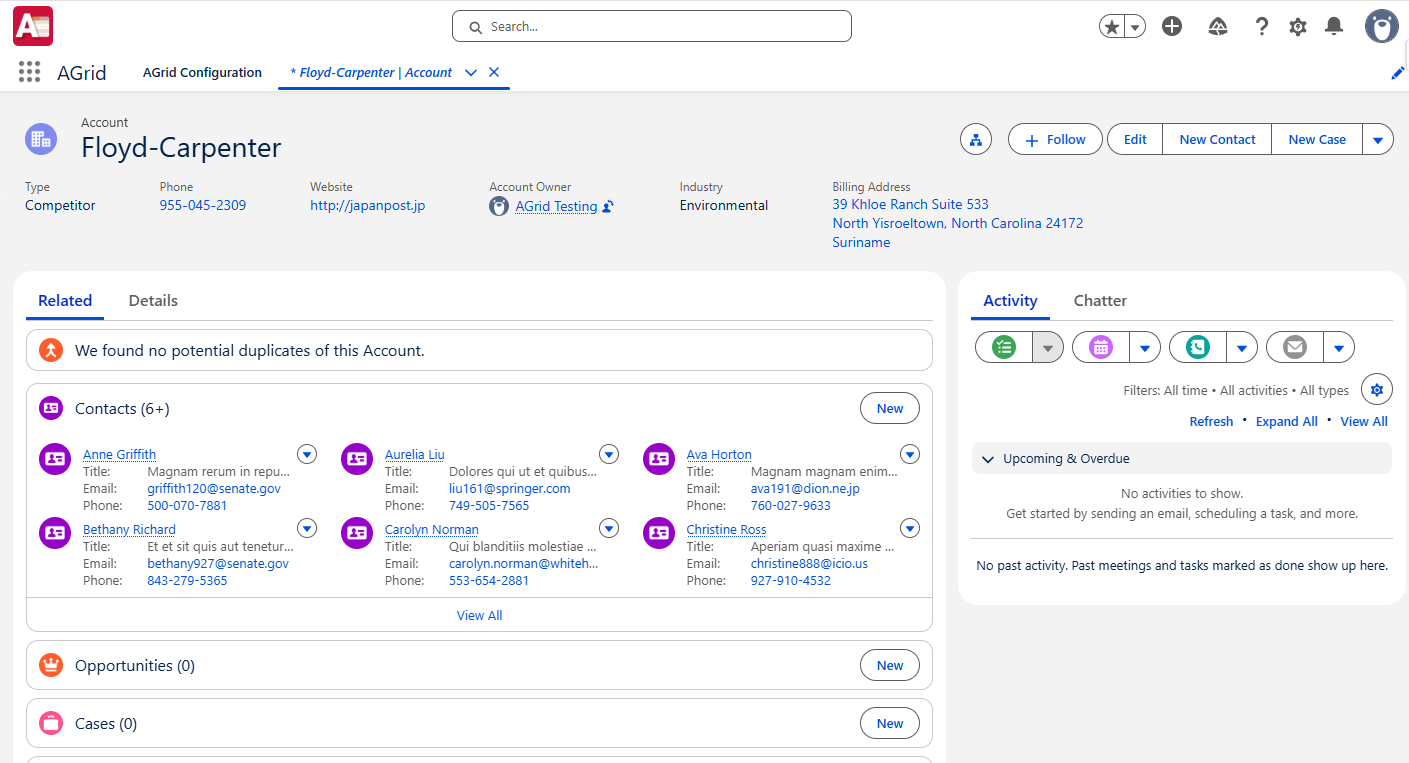
Related List Views help users:
- See connected records in context
- Avoid searching across multiple objects
- Work from the parent record page
- Understand customer, sales, or support history faster
They are important for daily CRM workflows because users rarely work with one record alone. Sales, service, operations, and admin teams all depend on related records to complete their work.
Why Standard Related List Views Are Not Enough for Modern Teams
Standard Related List Views are helpful, but they can become restrictive when teams need more control.
Common limitations include:
- Limited interaction with data: Users can view related records, but deeper work often requires opening records one by one.
- No strong bulk editing experience: Updating multiple child records from the parent page can become repetitive and time-consuming.
- Limited visual insight: Standard related lists do not provide built-in grid-level charts, Kanban views, summaries, or conditional highlights.
- Fragmented actions: Users may need to leave the record page to launch flows, update selected records, or perform custom business actions.
This is the core salesforce related list limitation: the records are visible, but the workflow around those records is limited.
Introducing AGrid for Salesforce Related List Views
AGrid is a no-code, grid-based enhancement layer for Salesforce records. It can be used as a standard list view, a Related List View, or an Intelligent Related List.
To use AGrid as a Related List View, admins can:
- Create an AGrid configuration for the child object they want to display.
- Add the required columns, filters, sorting, actions, and view settings.
- Open the Lightning record page where the related records should appear.
- Drag and drop the AGrid List View component onto the page.
- Select the required AGrid configuration.
- Enter the Parent Field Name to connect the child records to the current parent record.
For example, if an admin wants to show Contacts on an Account record page, they can create an AGrid configuration for Contacts and use the Account lookup field as the parent field. This allows AGrid to display only the Contacts related to the current Account.
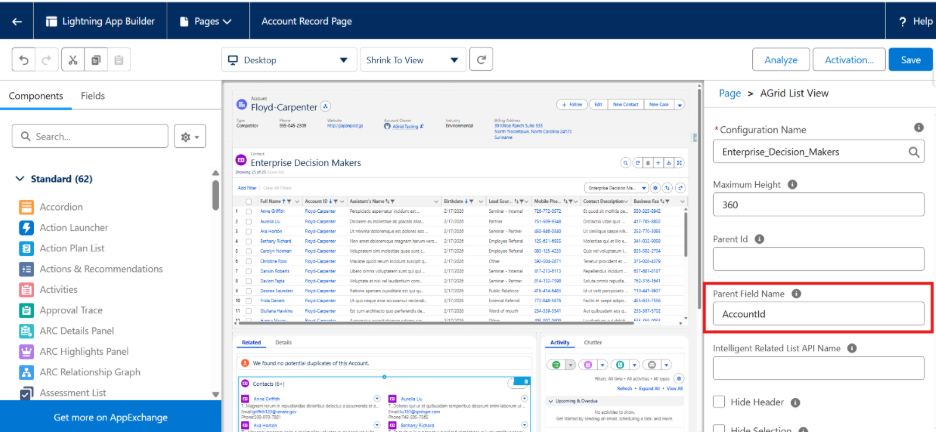
This setup helps admins replace basic related list sections with a more interactive grid experience, while still keeping users inside the same Salesforce record page.
In short, AGrid changes related lists from static record sections into interactive workspaces.
How AGrid Enhances Salesforce Related List Views
Turns Related Lists into Interactive Grids Inside Records
AGrid lets admins display related records in a configurable grid directly inside Salesforce record pages. With AGrid, admins can control: Columns, Filters, Sorting, Actions, Views, Display type, Grid layout, Preview before publishing
Users get a more flexible way to work with related records without leaving the parent record.
Inline Editing of Related Records
AGrid supports inline editing for fields marked as editable by admins. It also respects Salesforce permissions, field-level security, and record access. This means users can only edit what they are allowed to edit.
Admins can also control editing by:
- Making selected fields editable
- Disabling inline edit based on conditions
- Restricting bulk edit for picklist and multi-select picklist fields when needed
- Enabling partial save so valid changes can be saved while errors are shown for invalid values
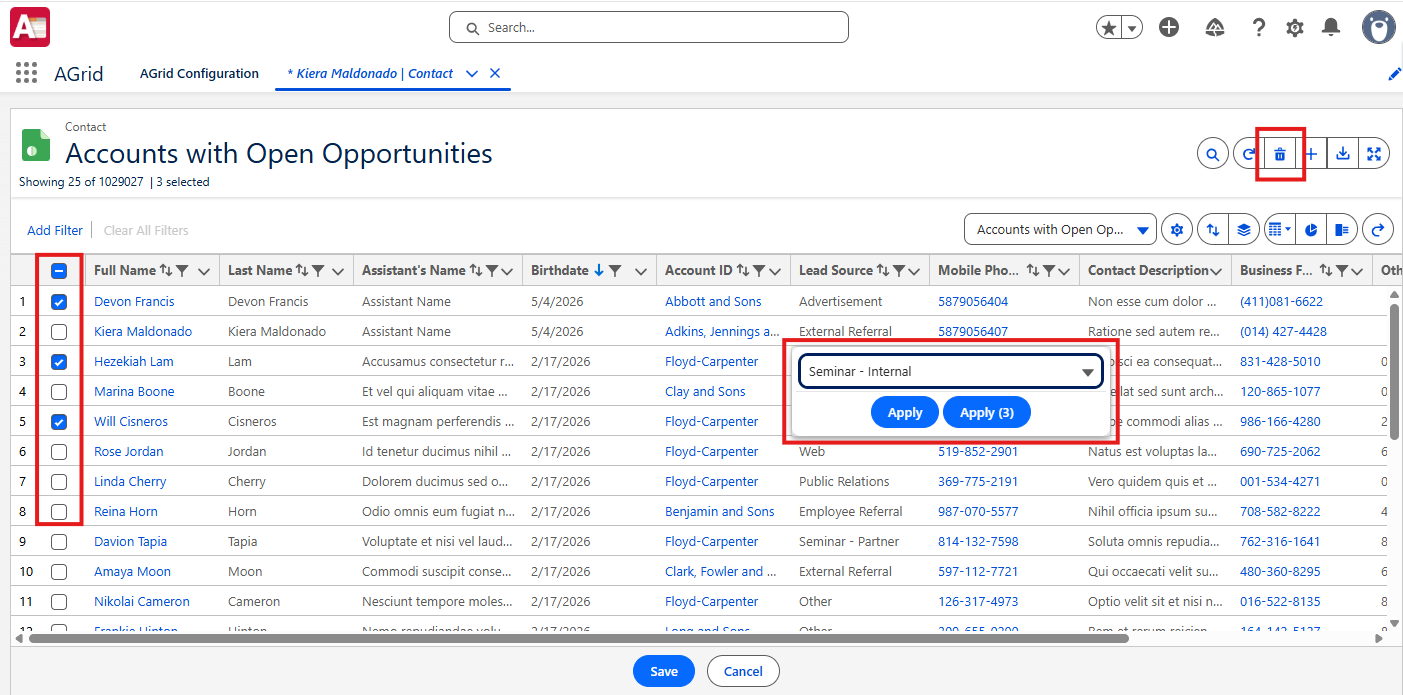
This reduces the need to open each related record separately.
Bulk Updates within Record Pages
AGrid supports bulk-friendly work directly from the record page. Depending on the setup, users can:
- Select multiple related records
- Update values inline
- Delete selected records
- Pass selected records into Flows, LWCs, or Lightning Components
This helps admins make related record creation faster and more consistent.
Bulk Create for Related Records
AGrid also supports Bulk Create, helping users create multiple related records from the grid.
Admins can configure which fields appear during record creation and how values should be pre-populated. Supported pre-population options include:
- Blank
- Static
- Reference Field

This is useful when users need to add several child records under a parent record, such as multiple Opportunity Products, related tasks, or supporting records. Instead of creating them one by one, users can enter multiple records in a structured way while admins maintain control over the required fields and default values.
Visual Insights Within Related Lists
AGrid adds more context to related records with visual and analytical options.
Admins can enable:
- Group By to organize records into sections
- Summaries such as Sum, Average, Max, and Min for numeric fields
- Chart View using Horizontal Bar, Vertical Bar, Donut, or Pie charts
- Kanban View to display records as cards grouped by fields such as Status, Priority, or Stage
- Conditional Rendering to highlight rows or columns, hide or disable actions, or disable inline editing based on rules
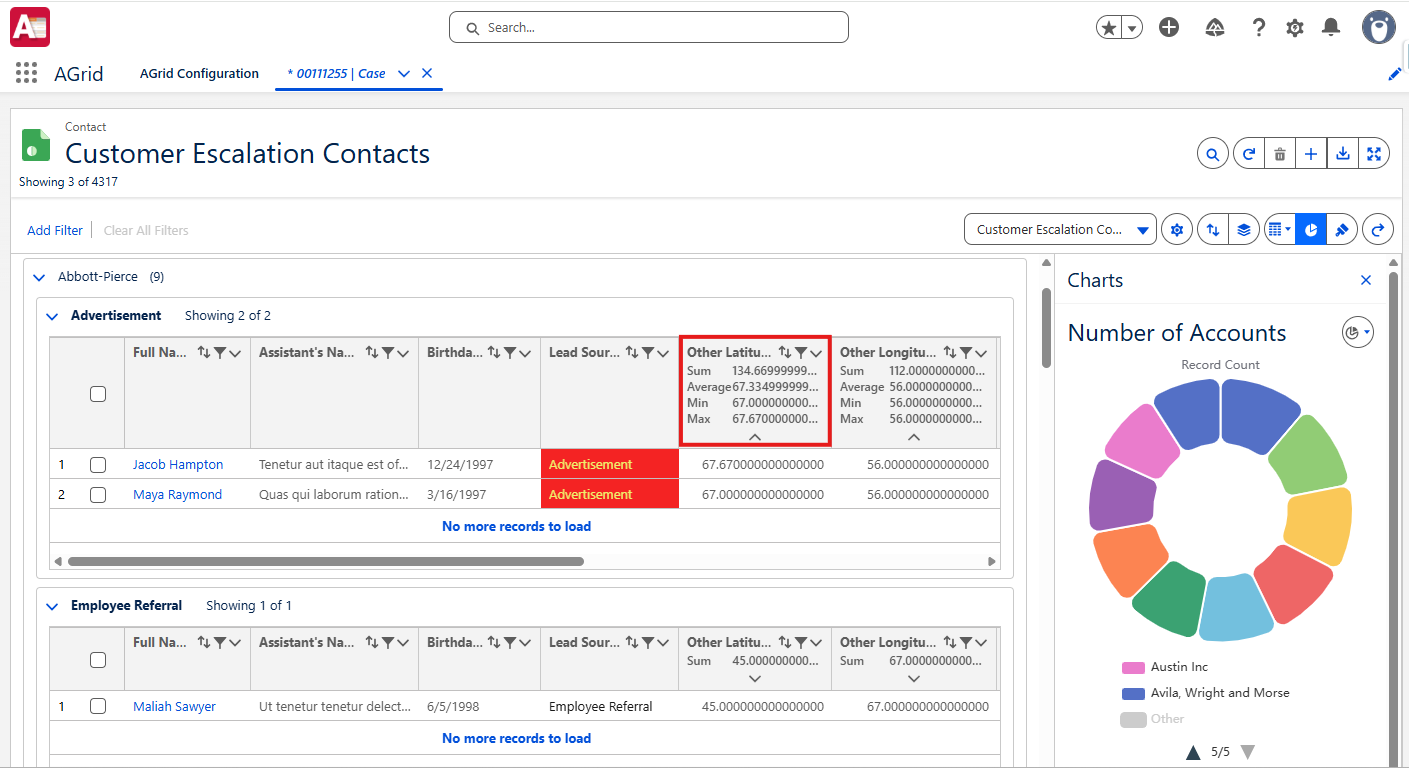
This helps users understand related records faster instead of depending only on reports or dashboards.
Intelligent Related Lists for Advanced Record Relationships
Standard Salesforce related lists usually depend on existing lookup or master-detail relationships. But teams often need to view records that are connected in more complex ways.
AGrid’s Intelligent Related List helps admins create virtual relationships between objects, even when a direct Salesforce relationship is not available.
It can support scenarios such as:
- Grandchild records
- Sibling objects
- Hierarchical child records
- Unrelated records connected through matching field values
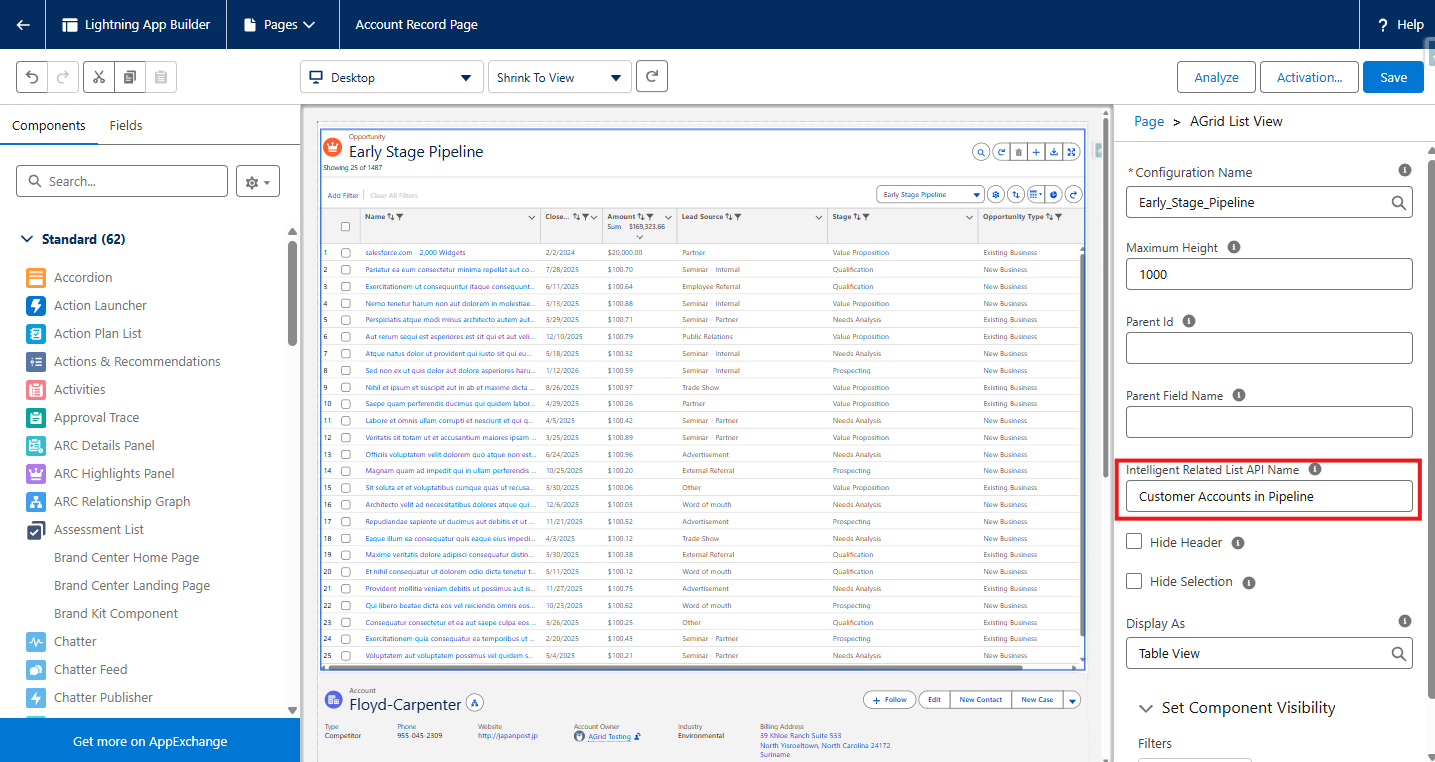
For example, an admin can configure AGrid to show Opportunity Products related to an Account through Opportunities, or show Opportunities related to a Case through a shared Account relationship.
This gives users better record context without requiring changes to the Salesforce data model.
Action-Driven Related Lists
AGrid brings actions into the related list workspace.
Standard row actions include: View, Edit, Delete, Clone
Custom row actions can launch: AGrid Configuration, AGrid Groups, Flows, Lightning Components, Lightning Web Components
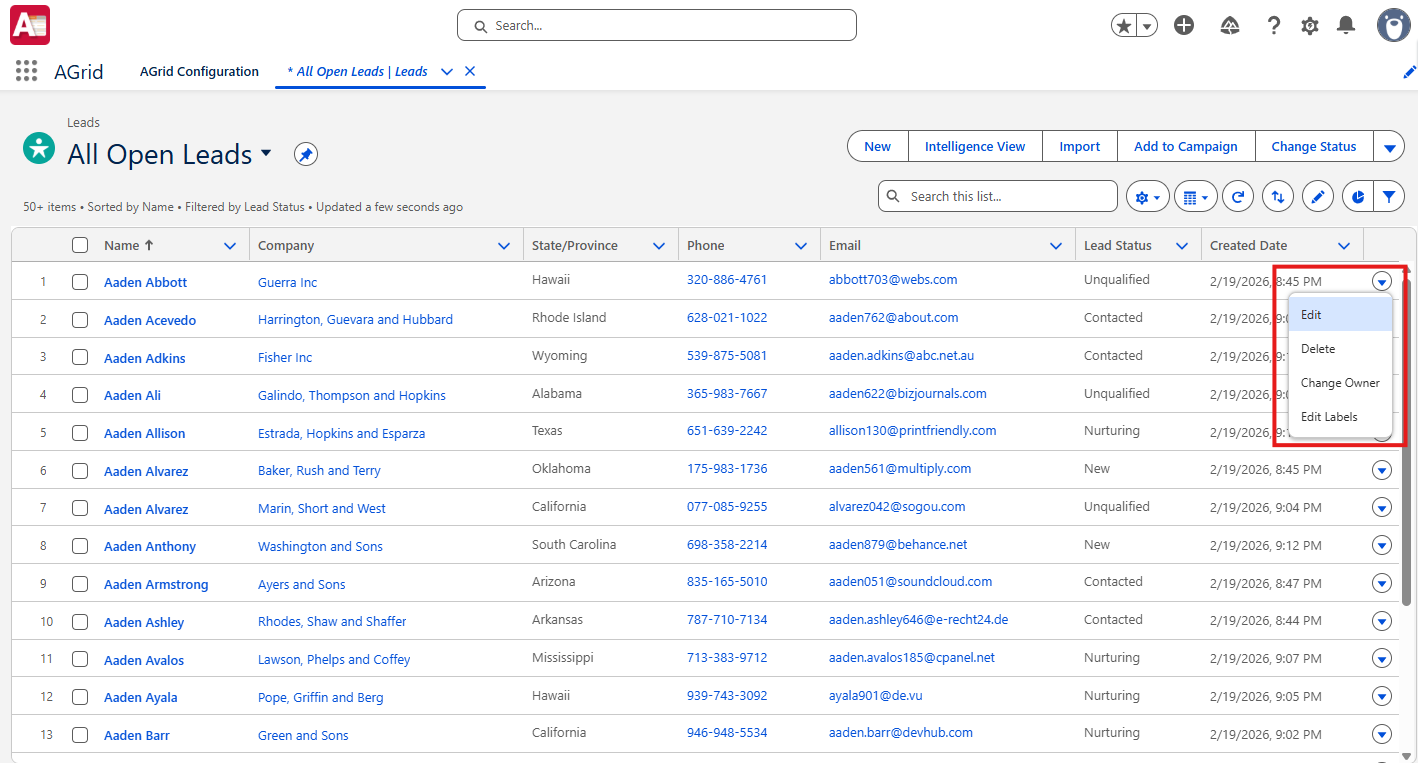
List actions can also support actions such as Create, Delete, Export, Focus Mode, Views, and custom Flow or component launches.

This helps users review records and act on them from the same grid.
When to Use AGrid for Related List Views
Use AGrid when Salesforce related lists need more than basic record visibility. It is helpful when users need to update, organize, analyze, or act on related records directly from the parent record page.
AGrid is useful when users need to:
- Edit child records from a parent record page
- Update multiple related records at once
- Create related records faster
- Apply advanced filters or sorting
- Save personalized views
- Group records for easier review
- View charts, summaries, or Kanban layouts
- Highlight important records based on conditions
- Launch Flows or custom components like Launch AGrid, AGrid Group, LWC, LC from related records
- Display sibling, grandchild, hierarchical, or unrelated records using Intelligent Related Lists
This makes AGrid a good fit when teams want the related list view Salesforce users already rely on, but with more flexibility and control.
Use Cases of AGrid for Related List Views
- Account teams managing Contacts and Opportunities: Sales teams can view related Contacts or Opportunities from the Account page, apply filters, sort records, update editable fields, and take configured actions from the grid.
- Opportunity teams managing line items: Users can review Opportunity Products, update supported fields inline, and use summaries for numeric fields when enabled.
- Support teams reviewing Case-related records: Service teams can review connected case records, highlight priority items, and launch actions such as Flows or custom components from the same workspace.
- Managers analyzing related records visually: Managers can use Chart View, Kanban View, Group By, and summaries to understand pipeline stages, case priorities, task status, or ownership patterns.
- Admins creating advanced related lists without changing the data model: AGrid’s Intelligent Related List feature supports virtual relationships for scenarios such as grandchild objects, hierarchical children, sibling objects, sibling records, and unrelated records.
Comparison of Native Related Lists vs AGrid
Native Salesforce related lists are useful for showing connected records, but they are limited when users need to manage records directly from the page.
AGrid extends the related list experience with grid controls, inline editing, bulk actions, visual insights, and advanced relationship handling.
Conclusion
Salesforce Related List Views help users see connected records, but they do not always give teams enough flexibility to manage those records efficiently.
AGrid helps overcome this limitation by turning related lists into interactive grid views where users can edit, filter, group, analyze, and act on records from the same page. It gives admins a no-code way to improve the related list view Salesforce teams use every day, without forcing users into separate reports, tabs, or custom-built pages.
For teams exploring how to overcome salesforce related list view limitations, AGrid makes Salesforce related lists more practical, actionable, and easier to manage.
Ready to Transform with AI?
More Insights for you






Ready to Transform Your Business with Salesforce & AI?
